Know where everything is today. Let the right people know where to start tomorrow.

Create your account, record what you hold, choose your nominees and decide how often we check in. Nothing reaches your nominees if you continue to log in.

14-day free trial · No card required · Cancel anytime

From sign-up to a working record

1

Create your account

About 2 minutes

2

Add what you hold

About 5 to 15 minutes the first time

3

Choose your nominees

The people you trust who will receive your summary if you ever stop responding

4

Set your check-in rhythm

Monthly to yearly

Add the rest whenever you like. Nothing reaches your nominees while you respond.

See it work

See the product before you set anything up.

A short interactive walkthrough of the setup. Go at your own pace and see how it works before you create an account.

No card required · Cancel anytime

Set up

Four steps to a working record.

You do all of this yourself, in your own time. Nobody else needs to be involved.

1

Create your account

Sign up with your email and password or sign up with Google. No payment details are needed during the trial.

Free for 14 days, no card
2

Add what you hold

Record where things are held, such as accounts, pensions and property. Values and account numbers are optional.

No passwords, PINs or seed phrases
3

Add your nominees

Add family, executors, trustees or advisers. Choose one as your primary and verify them.

Nominees never get a login
4

Set your check-ins

Choose how often we ask you to log in and confirm your records are current, and how many prompts you can miss.

We suggest every 3 months and 2 missed prompts

A primary nominee is the person you choose for SuccessionKeeper to contact first if you stop responding. We ask them to try to reach you and encourage you to log in. Nothing is released at this stage. Their role is an additional safeguard before any structured summary is sent to your nominees.

Useful today

Useful today, not only if something happens.

Add what you hold once and your whole picture appears in one private view.

One view of everything you record

Property, pensions, investments, banking, crypto and insurance, across any country or currency.

How much you could reach quickly

Liquid and long-term assets side by side, so you can see what is easy to get at and what is locked in.

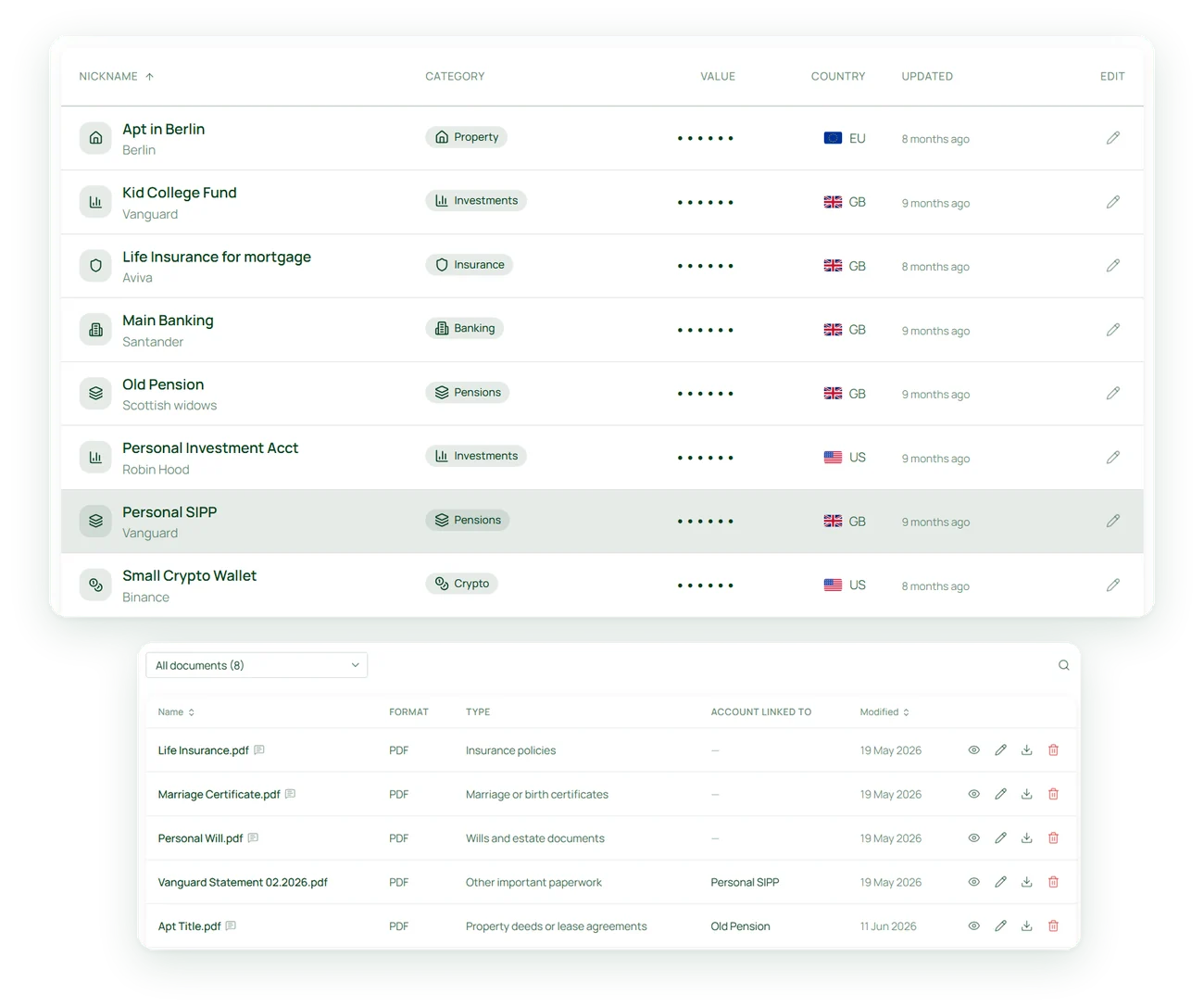
The accounts you have stopped using

Every entry shows when you last updated it, so the forgotten ones are easy to spot.
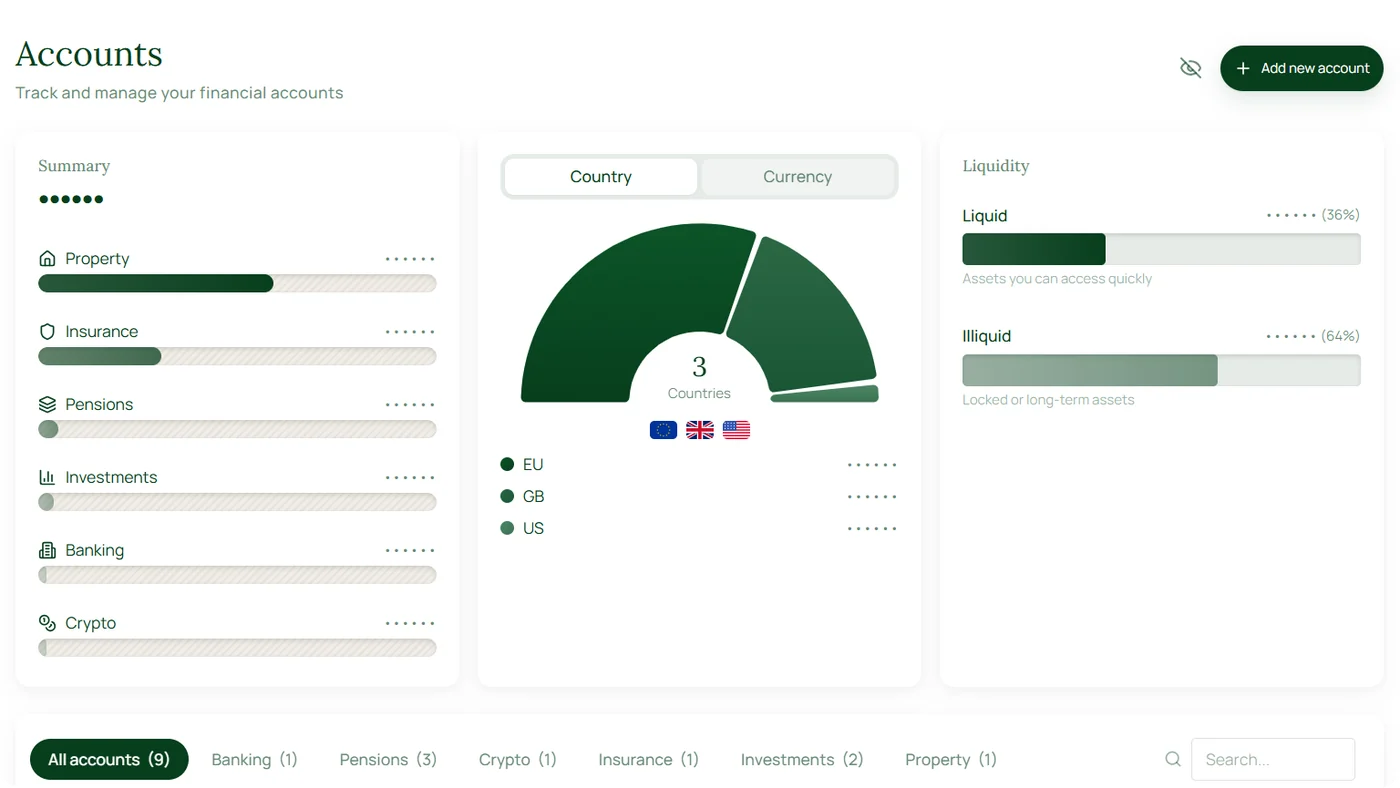
SuccessionKeeper Accounts overview with sample account data
Summary by typeCountry and currencyLiquid and long-term

SuccessionKeeper shows you the picture. Decisions about moving or closing an account stay with you and your provider or adviser.
Documents and reminders

In one place, with reminders.

Keep the documents beside the account they belong to, and let check-ins remind you to review.

Account statements

Attach statements, policies and certificates to the account they relate to, up to 20 MB per file.

A reminder to keep it current

Check-ins ask you to confirm your records at your desired frequency, so the list is less likely to drift out of date.

Share the view with someone you trust

Link two accounts and see both together. The other person can view, but cannot change anything.

SuccessionKeeper accounts list and documents list with sample data

And if you ever cannot explain it, someone you trust already knows where to start.

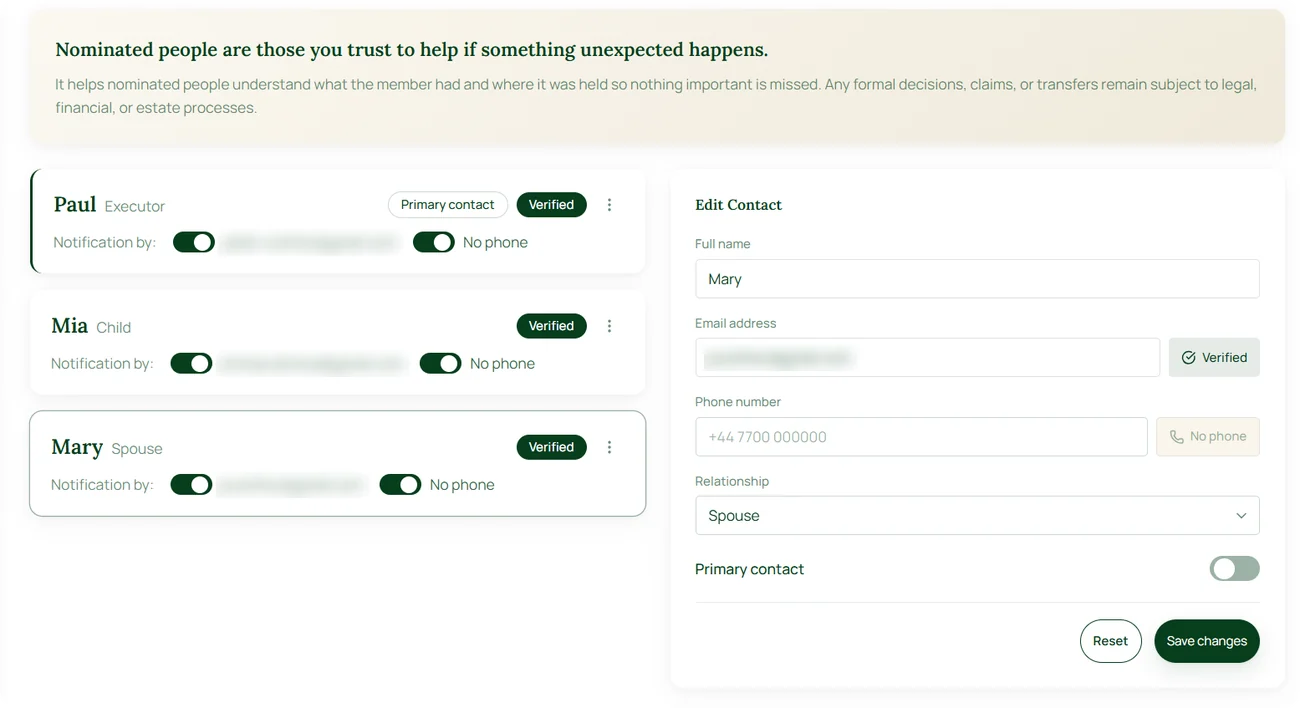
Your nominees

Check they can be reached, before it matters.

Verify each nominee's contact details when you add them. It is optional, and we strongly recommend it.

Avoids emails going to spam

If something happens, our message goes to a monitored email address.

Less chance of being ignored

A nominee who has already heard from us is less likely to lose our email to spam or ignore it as unfamiliar.

Gives no access

Verifying a contact gives them no system access and no login.

Nominee list in SuccessionKeeper showing Verified badges

Each nominated person shows a Verified badge once their details are confirmed.

Nominees never get a login. They only ever receive a structured summary.

Household account linking

Link two accounts for a shared view.

Both people need an account, and the app offers to link them. You each stay in control of your own.

Both accounts together

See both records together. The other person can view your records but cannot add, change or delete anything.

View only

Linking is not the same as naming a nominee.

A linked person can view your records now. A nominee receives a structured summary only if the process runs its course, and never gets a login.

Check-ins

Set your check-in rhythm.

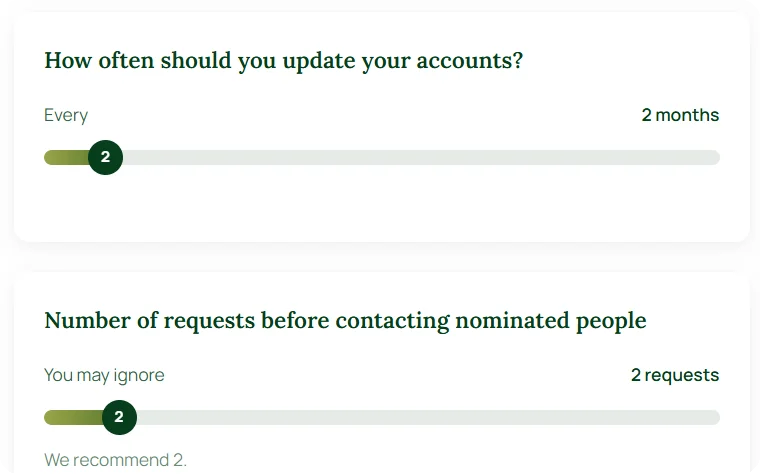
You decide how often we ask you to log in and confirm your records are current. You also decide how many missed prompts trigger contact with your primary nominee.

Check-in settings: how often to update and how many requests before contacting nominees

Check-in frequency

We recommend every 3 months. You can choose anything from monthly to yearly.

Missed prompts allowed

Set how many prompts you can miss before we contact your primary nominee. We recommend 2.

Final warning email

Your last reminder before we contact your primary nominee is clearly labelled. No surprises.

Easy to update. Change your settings, frequency or nominees at any time.

Controlled release

Five weeks of contact before anything is released.

This only begins after you miss the check-ins you chose, and logging in once cancels it completely.

Week 0

Final warning to you

A labelled email reaches you once your chosen check-ins are missed.

Nothing released

Week 1

Your primary nominee is contacted

They are asked to remind you to log in, and nothing is disclosed to them.

Nothing released

Weeks 2 to 4

Weekly contact continues

Your nominee hears from us each week while the process runs.

Nothing released

Week 5

The final week of outreach

Logging in still stops everything, right up to the end.

Still stoppable

After

Your nominees receive a summary

Only if it runs its course. The same summary for every nominee.

Only now released

Logging in at any point cancels the sequence completely, and nothing is sent.

You choose how often we check in and how many prompts you can miss before this begins.

What nominees receive

A summary, never an open door.

If the process runs its course, every nominee you include receives the same structured summary to help them act. They never receive a way in.

What they receive

The institutions where you hold accounts

Asset categories, such as banking, pensions, property, investments and crypto

Account numbers and last known values, if you chose to add them

Your notes and instructions

Your attached documents

Any adviser you have noted on an account or document

What they never receive

Usernames or passwords

PINs or transaction authority

Crypto private keys or seed phrases

Any way to move, transfer or close an account

Any authority to make decisions. That stays with your executors and the courts.

See it first

See what your nominees would get, before you commit.

During your trial you can run a preview release and see the summary your nominees would receive. The example shows the kind of detail it holds, and what it leaves out.

Start your free 14-day trial

No card required · Cancel anytime

Summary your nominees receive

Sample, dummy data

Banking

Example Bank

Joint current account. Statements are in the blue folder.

Pensions

Example Pension Scheme

Workplace pension. Adviser: Example Financial Planning.

Insurance

Example Insurer

Life cover. Policy schedule attached.

Property

Family home

Deeds held by Example Solicitors.

Crypto

Hardware wallet

Where the device is kept. No keys recorded.

Includes your notes and 2 attached documents. No logins, PINs or keys.

Your data

Leave whenever you like, and take your records.

You can close your account at any time. What happens to your data is your choice.

Delete everything now

Download it, then delete it.

1

Download your data

2

Delete your data and your account

That is all it takes.

Close your account

Close it and leave the rest to us.

If you close without deleting, we delete your data after 90 days.

Billing and cancellation terms are on the pricing page. See pricing →

Frequently asked questions

Questions about the process

What if I log in during the five weeks?

Logging in at any point cancels the sequence completely and nothing is sent.

What if my primary nominee cannot be reached?

The process continues and relies on your wider group of nominees.

Does it wait for a death certificate?

No. The process starts from inactivity, not from a death certificate.

Can my nominees see my information now?

No. They receive a summary only if the process runs its course without a response from you.

What does my primary nominee do?

Their only role is to remind you to log in. They receive the same summary as your other nominees, and only if the process runs its course.

Can I change my nominees or check-ins later?

Yes, at any time. A removed nominee is only told if you choose to tell them.

More questions about security, privacy and the product? Read the full FAQ →

Get started

Two minutes to start,
and you decide the rest.

Create your account, add one provider and choose your check-ins. Add everything else at your own pace.

Start your free 14-day trial

14-day free trial · No card required · Cancel anytime

Want the price first? See pricing →

Last reviewed 21 October 2026 · SuccessionKeeper provides record-keeping tools and general information. It does not provide financial, tax or legal advice.